
Fleet Lifecycle Planner
Two Chromebooks bought the same afternoon can reach end-of-life years apart. The planner reads the real manufacture date on every device, corrects for the platform-release clock behind Google’s “10-year” headline, and turns it into a retirement forecast by year and by school.
What it does
Every Chromebook fleet has an end-of-life date, and it is almost never the one on the purchase order. Google’s 10-year ChromeOS update window is measured from the hardware platform’s release date, not the day you bought the device. A Chromebook purchased in 2020 can sit on a 2017 platform and reach Auto Update Expiration years earlier than “10 years” implies.
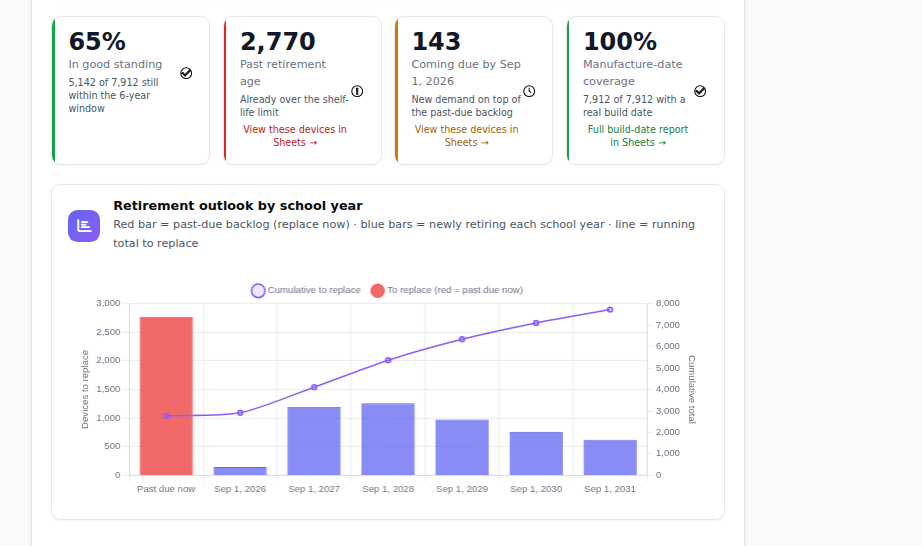
The planner starts from when each device was actually built. It takes the manufacture date from Google where Google has it, decodes it from the serial number for HP and Acer devices, and looks it up from the manufacturer’s warranty service for Dell and Lenovo. Each device’s retirement date is then the earlier of two lines: your district’s shelf-life policy (set by you, default five years, anchored to September 1) or its AUE date. Whichever comes first is the date that matters, and the report tells you what share of the fleet has a real manufacture date behind it so you know how solid the picture is.
What lands on screen is a plan rather than a data dump: the past-due backlog of devices already over your retirement line, the retirement outlook by school year, the same broken out by school, the share of the fleet in good standing, and a one-click export to Google Sheets. The 2020 and 2021 purchase wave is reaching its retirement line while the federal funding that paid for it has expired; the planner turns that into a schedule you can phase across budget years.
- ✓ Real manufacture datesFrom Google’s manufacture date field, HP and Acer serial-number decoding, and Dell and Lenovo warranty lookups, with the fleet’s coverage shown so you know how complete the picture is.
- ✓ Corrects the platform-release clockRetirement is computed from when the hardware was built and when its platform’s updates end, not from the purchase order.
- ✓ Whichever line comes firstEach device retires on the earlier of your shelf-life policy or its AUE, so age-outs and update expirations resolve to one date.
- ✓ By year and by schoolHow many devices retire each school year and in which buildings, so purchasing can be paced across budget cycles.
- ✓ The past-due backlogDevices already over the line, still assigned to students, listed for triage.
- ✓ One click to Google SheetsThe forecast with coverage and good-standing figures already computed, for the budget conversation.
Requires
- The Enterprise plan.
- Devices synced from Google Workspace. Manufacture-date backfill from serials and warranty services runs on your fleet after sync.
Does not
- Price the refresh. It forecasts counts and timing; attach your per-device pricing in Sheets. Dollar budgeting is on the roadmap.
- Find a manufacture date for every device. Some serial formats cannot be decoded and some manufacturers have no lookup; those devices fall back to AUE alone, and the coverage figure tells you how many.
- Change anything in Google. It is a report.
Where it fits
Phasing the refresh
Filter to devices retiring in the next 24 months, see the count per school, and walk into budget season with a multi-year phase-out instead of one emergency purchase.
Clearing the fleet for state testing
Testing platforms eventually refuse devices whose ChromeOS has fallen behind. Before the window, pull the past-due backlog and anything expiring this school year, and swap them on your schedule.
Triaging the devices already over the line
The past-due view lists every device past your retirement line that is still assigned to a student. Those past AUE are no longer receiving security patches while holding student data; your technicians work that list first.
Frequently asked questions
How is this different from the AUE date in the Google Admin console?
The console shows a date per device. The planner adds the real manufacture date, applies your own shelf-life policy, takes the earlier of the two, and rolls the result into a forecast by school year and by school instead of a per-device lookup.
Why not count ten years from when we bought the devices?
Because Google’s update window is measured from the ChromeOS platform’s release, not your purchase. A Chromebook bought in 2020 on a 2017 platform reaches AUE years earlier than ten years from purchase. Counting from purchase overstates how long the fleet is safe.
Where do the manufacture dates come from?
Three places: Google’s manufacture date field where it is populated, decoding of HP and Acer serial numbers, and Dell and Lenovo warranty lookups by service tag or serial. Each date is checked against the device’s AUE for consistency, and the report shows the share of the fleet with a real date.
Can we set our own retirement policy?
Yes. The shelf-life policy is yours: the default is five years anchored to September 1, and you can change both. Each device then retires on the earlier of that line or its AUE.
Does it tell me what the refresh will cost?
Not yet. It forecasts how many devices retire, when, and at which schools, and exports to Google Sheets so you can attach your own pricing. Dollar budgeting is on the roadmap.
Why does AUE matter for compliance and not just performance?
After AUE, security patches stop and Google states that admin policies may not work as intended. The device still powers on, but known vulnerabilities go unpatched on hardware holding student data, and the policies your filtering relies on begin to degrade.
Find out which Chromebooks retire first
The Fleet Lifecycle Planner is part of the Enterprise plan, priced per student, à la carte. Start free first: the gap report lists every device with no owner and every student with no device.